


Alison: Online Learning App
4.72.53K Reviews
App Specs
- Version
- 3.4.212
- Updated On
- License
- Free
- Downloads
- 10,000,000+
- Developer
- Alison eLearning
- Categories
- Education
- Platform
- Android, iOS
Screenshots
 Analysis by AppCompare
So, I recently got my hands on the Alison: Online Learning App, and let me tell you, it’s been quite the educational ride. Whether you’re looking to pick up a new skill, dive deeper into a subject you’re passionate about, or just explore something new, this app seems to cover it all. Let's dig into what makes it tick.
What I’d use it for between everyday commitments
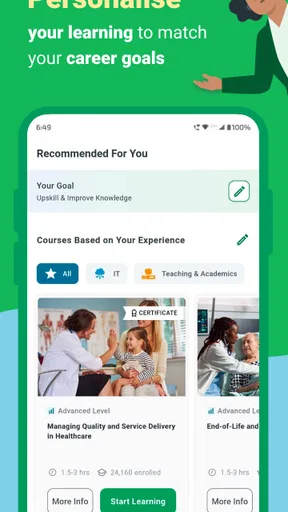
The most practical way I found to approach Alison is to begin with a clear, modest goal rather than browse until a topic catches my eye. If I had a spare half-hour after work, for example, I’d choose one course connected to a task I actually need to do—such as getting more comfortable with a business concept or exploring a coding topic—and keep returning to that same course. A small, focused plan makes a large catalog feel more manageable.
That approach also helps answer a common question: is this better for casual exploration or serious study? I think it can serve both, but it works best when I treat a course as a sequence instead of expecting a quick browse to create lasting skill. For a learner trying to sample several subjects, the range is appealing. For someone who needs structured feedback, live instruction, or close supervision, a classroom or tutor is likely a better fit.
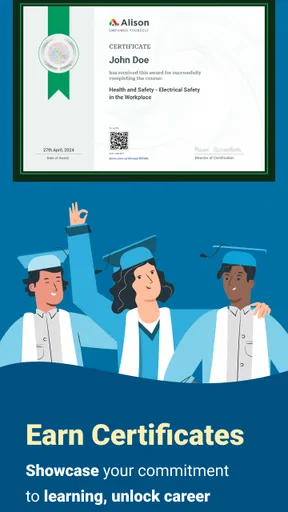
Another useful choice is to decide what “finished” means before starting. I might want a basic understanding, a way to practise a workplace skill, or a course completion credential; those are different goals and call for different levels of follow-through. A certificate can be a helpful record of learning, but I would still check whether a particular employer or professional body values that credential before relying on it for a formal requirement.
First Impressions and Interface
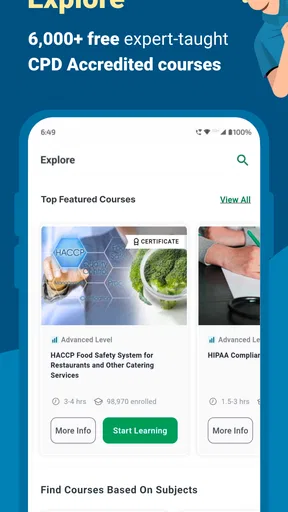
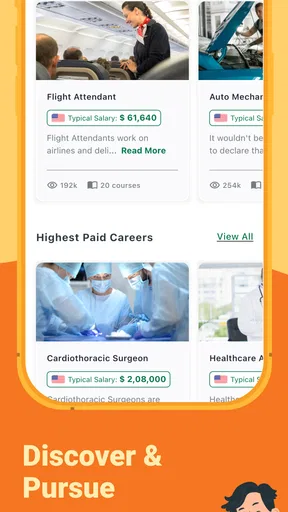
When I first launched the app, the interface was clean and inviting. I mean, who doesn’t love a user-friendly design? The homepage greets you with a variety of course categories, from technology to languages, and even soft skills like communication and leadership. Navigation is pretty intuitive, with everything just a tap away. It’s like they knew I didn’t have time to fumble around looking for things.
Speed expectations and course browsing
For a learning app, I care less about flashy transitions than about getting back to the right course without wasting attention. Alison’s straightforward layout supports that kind of use: I can browse by subject, choose a learning path, and spend my limited study time on the material rather than repeatedly figuring out where to go. The actual feel of any online content can still depend on the connection and device, so I wouldn’t assume every video or page will behave identically in every setting.
A small but useful habit is to shortlist a few relevant courses before committing. Course titles can make neighbouring subjects sound equally suitable, while the lesson outline is a better way to judge whether the content matches what I need. I’d check the level and topics first, then start one course instead of scattering attention across several. That reduces the chance of collecting unfinished starts rather than building usable knowledge.
Worth Reading Before You Choose

Flipboard Shows What News Apps Must Do Beyond the Feed

Switching to Android Auto Means Rethinking Your Driving Routine

Google Calendar Makes a Crowded Week Easier to Manage

Ludo King Makes the Most of the Minutes Between Plans

Baby Panda World Brings Quick Play to Modern Phones, but Its Game Library Feels Busy

ESPN’s Live Game View Makes Following Close Games Easier
Diving into Courses
Once I started browsing through the courses, I was genuinely impressed by the sheer variety. Whether you’re a beginner or looking to refine your expertise, there’s something here for everyone. The courses are well-structured, with a mix of video lectures, quizzes, and assignments. It’s like being back in school, but without the stress of deadlines breathing down your neck.
One feature I particularly enjoyed was the self-paced learning. You can start and stop whenever you want, which is perfect if you’re juggling a busy schedule. Plus, the app keeps track of your progress, so you’ll always know where you left off.
Making short study sessions count
That flexibility is especially helpful when a day doesn’t leave a clean block of study time. I could picture opening a lesson during a quiet lunch break, completing a manageable section, and returning later rather than waiting for a free evening. To make that routine stick, I’d note one question or idea after each session. A brief personal note gives me a reason to reconnect with the material next time and makes it easier to spot what I still don’t understand.
Quizzes and assignments can also be used as checkpoints, not just as hurdles on the way to completion. If I get a concept wrong, I’d revisit the relevant lesson before moving ahead instead of clicking through simply to finish. That takes a little more patience, but it turns a self-paced course into active practice. The trade-off is that independent learning puts the responsibility for review on me; there may not be a teacher noticing when I have misunderstood something.
Heavy-use moments and reliability
When I’m using any course app for a longer stretch, the strain is usually less about the number of screens and more about the learning routine: switching between lessons, quizzes, and notes, or trying to study while distracted. Alison’s course format gives me a clear reason to pause between those activities. I’d avoid opening several unrelated courses at once, since that can make it harder to remember where I left off even when progress is saved.
Progress tracking is reassuring for interrupted study, but I’d still make a simple personal note if I stop in the middle of a complex topic. A saved position tells me where I was; a note such as “review the difference between these two terms” tells me what to do next. That distinction is useful after a busy day or a gap between sessions, and it reduces the mental effort of picking up a course again.
Community and Support
Another cool feature of the Alison: Online Learning App is the community aspect. There’s a forum where you can interact with other learners, share insights, and ask questions. It’s like having a study group but in your pocket. Plus, if you ever run into any issues or have questions, the support team is just a message away. They’re pretty quick to respond, which is a relief.
I’d treat the forum as a supplement rather than a substitute for instruction. It can be useful when I want to compare how other learners interpret a topic or explain an idea in everyday language. For a question that affects an important work decision, though, I would verify the answer with a qualified source instead of assuming a peer discussion is authoritative. The social layer is most valuable when I arrive with a specific question, not when I expect it to provide a personal tutor.
Certification and Career Opportunities
Now, here’s something that really caught my eye: the certification. Upon completing a course, you can get a certification that’s recognized by employers around the globe. It’s a nice little badge of honor you can add to your resume or LinkedIn profile. And speaking of career moves, the app also features job postings related to your completed courses. Talk about convenience!
For career planning, I’d use a course certificate as evidence of initiative and a prompt for conversation, not as a replacement for a qualification that a role specifically requires. A practical next step is to connect what I learned to a small example: a spreadsheet I improved, a short coding exercise, or a clearer explanation of a business idea. That makes the learning easier to discuss in an interview than a credential alone. If a job posting looks relevant, I’d also assess the role’s requirements separately rather than assume course completion guarantees a match.
Accessibility and Device Compatibility
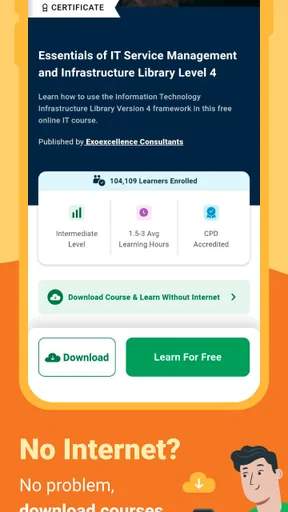
The app is available on both Android and iOS, and it syncs seamlessly across devices. Whether you’re on your phone, tablet, or laptop, your learning materials are always within reach. The offline mode is a lifesaver for those times when you’re on the go without a reliable internet connection.
Device limits and choosing the right alternative
For learners using an older or lower-powered phone, the sensible test is to try a short lesson first and see whether reading, video playback, and moving between course sections feel comfortable. The app is an education product rather than a demanding game, but online media can still be affected by network quality and device capability. If a phone is awkward for sustained study, using a larger screen for longer sessions may be more comfortable; the phone remains handy for brief reviews and catching up.
Offline access is useful when I know I’ll be travelling or dealing with an unreliable connection, but I’d prepare before leaving rather than assume every part of a course will be available offline. I’d check what I can access while connected and plan a session around that material. For learners who mainly want quick answers, a reference site or a focused tutorial may be faster. For a guided sequence of lessons across subjects, Alison is the more natural choice; for direct feedback and accountability, live classes or a mentor have the advantage.
Cost, expectations, and who should choose it
Alison is a free education app from Alison eLearning, with optional in-app purchases priced from $2.49 to $105.50 per item. I like being able to start without paying, but I would check the details of any paid item before buying and decide whether it serves my goal. The app is rated for Everyone, which makes it broadly accessible, though younger learners may still benefit from an adult helping them choose courses and set a realistic study routine.
Its 4.7 average from around 145,000 ratings, alongside more than 10 million installs, suggests that many people have tried it, but popularity alone doesn’t tell me whether a particular course suits my needs. I’d judge the fit by the subject outline, teaching style, and whether I can make time to complete the material. The current version is 3.4.169, and it runs on Android 7.0 or later, so checking device compatibility before installing is a simple way to avoid a frustrating start.
Final Thoughts
Overall, the Alison: Online Learning App is a fantastic tool for anyone looking to learn something new or advance their career. The diverse course offerings, intuitive design, and community support make it a standout in the world of online learning. It’s like having a personal library of knowledge right in your pocket.
If you’re ready to embark on a new educational journey, I’d say give Alison a shot. You might just find that unlocking your next skill is only a tap away. Happy learning!
Pros
- Wide range of courses available.
- User-friendly interface.
- Certificates upon completion.
- Free access to many courses.
- Mobile-friendly design.
Cons
- Some courses require payment.
- Limited offline access.
- Ads in free version.
- Certificate accreditation varies.
- Occasional technical glitches.
FAQs for Alison: Online Learning App
What types of courses are available on the Alison app?
The Alison app offers a wide range of courses across various disciplines, including business, technology, health, language, and personal development. Whether you're looking to enhance your professional skills or explore a new hobby, Alison provides comprehensive and free online courses tailored to different learning needs.
Is Alison’s certification recognized by employers?
Alison provides certificates and diplomas upon completion of courses, which are recognized by many employers worldwide. However, it's always a good idea to check with potential employers or educational institutions to ensure they accept Alison certifications, as recognition can vary depending on the industry and location.
How much does it cost to access courses on Alison?
Alison offers free access to all of its courses. However, if you wish to receive a certificate or diploma upon completion, there may be a fee. Additionally, there are premium options available that offer an ad-free experience and additional features, such as course assessments.
Can I access Alison courses offline?
Currently, Alison does not support offline course access. You need an active internet connection to stream the course content. This ensures you have access to the most up-to-date materials and interactive elements that require an online connection.
How user-friendly is the Alison app for beginners?
The Alison app is designed to be intuitive and easy to navigate, even for beginners. With a clean interface, users can quickly search for courses, track their progress, and manage their learning paths. However, new users may benefit from exploring the app’s tutorials and support resources to maximize their experience.


